What is Amazon TACoS?
TACoS stands for total advertising cost of sale. You take ad spend for a period, divide it by all sales in that period and multiply by 100. ACOS uses the same spend but divides it by ad revenue only, the sales Amazon attributes to a click. [cs]
Commerce Spine already returns ACOS and ROAS as derived metrics in its documented queries. TACoS is the one extra division you add, because it needs a sales figure from Seller Central next to spend from the Ads side. Both live on the same row in the account performance entity. [cs]
That pairing is the hard part when you work straight from Amazon. Amazon hands out Ads, Seller Central, Vendor Central and Brand Analytics as separate APIs, each with its own auth, shapes and rate limits. Commerce Spine stores them in one warehouse, joined and query-ready. [cs-site]
How is TACoS different from ACOS?
ACOS tells you whether ad clicks pay for themselves. TACoS tells you how much of your whole business you buy with ads. A campaign can hold a steady ACOS while TACoS climbs, and that usually means organic sales slipped and ads carried more of the load. [cs]
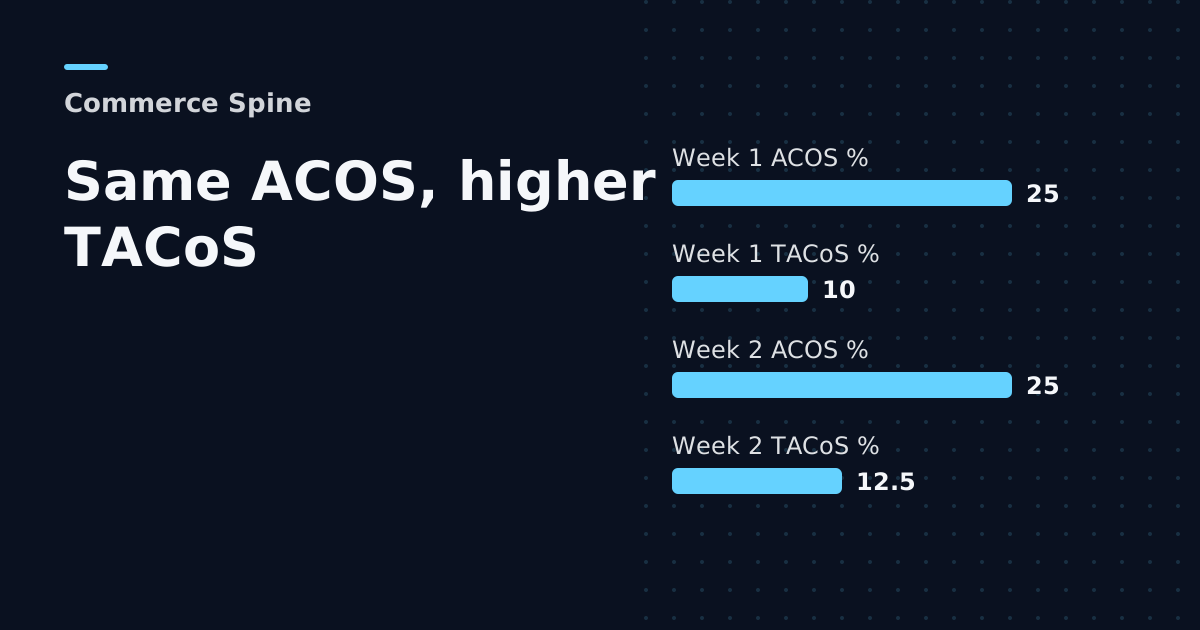
Take a worked example with round numbers. In week one you spend $1,000 on ads, ads bring in $4,000 and the account sells $10,000 in total. ACOS is 25% and TACoS is 10%. [cs]
In week two spend and ad revenue stay the same, so ACOS is still 25%. Total sales drop to $8,000 because organic orders fell. TACoS rises to 12.5%. An ACOS report shows a quiet week. The TACoS line shows the drop. [cs]
Which Commerce Spine fields do you need for TACoS?
You need adSpend and one sales field from the same entity and the same dates. accountPerformance returns 16 fields per account per day, including adSpend, adRevenue, orderedRevenue, shippedRevenue and totalProductSales. productPerformance returns 18 fields per product and SKU per day with adSpend, adRevenue, orderedRevenue and totalProductSales. [cs]
Pick one sales field as your denominator and keep it. The data coverage overview lists what each source adds. totalProductSales and orderedRevenue are both on the row, and switching between them halfway through a report changes the number without anything changing in the account. Write the choice into the query your agent saves, so every weekly run divides the same way. [cs]
Campaign, keyword, search term and target entities carry adSpend and adRevenue but no total sales field. That gives you ACOS at campaign level and TACoS at account and SKU level. Treat a campaign TACoS from any tool with care: total sales do not belong to one campaign. [cs]
How do you calculate TACoS with a query?
Start with amazonAccounts to list the accounts your token may read, and use an id from that list as accountId. Then call accountPerformance with a dateRange and ask totals for adSpend and the sales field you chose. TACoS for the period is adSpend divided by that total, times 100. [cs]
Leave out accountIds and the API uses every account you are authorized for, which suits an agency that wants one TACoS line per client. A request for an account outside your scope returns FORBIDDEN_ACCOUNT_SCOPE. A range longer than 90 days returns DATE_RANGE_TOO_LARGE, so split a quarter into smaller windows. [cs]
Daily rows let you build the trend instead of a single figure. Pages hold up to 500 rows, and you pass the returned endCursor as after to fetch the next page. The documented example sorts by adSpend descending with orderBy, so your agent sees where spend matters most first. [cs] [cs-site]
Why track TACoS per SKU and week over week?
An account TACoS hides the products that drive it. One SKU that leans on ads can sit inside a healthy account average. productPerformance gives you spend and sales per SKU per day, so the same division runs for each product. [cs]
The number gets useful once it repeats. Commerce Spine's API has a versioned contract, so the same query returns the same shape every week. That is what makes Amazon data for AI agents practical: your agent can write a scheduled job that posts TACoS per SKU each Monday and flags the products whose TACoS moved most since last week. [cs-site]
Everything stays read-only. Tokens cannot touch bids, listings, prices or inventory, so the agent reports and drafts while you decide what changes in the account. If you already build on Amazon's own ads API, keep in mind that it needs an application and approval first. [cs-site] [amz-ads]
How much history can you use?
Each account gets 30 days of history backfilled at the first sync, and Commerce Spine keeps everything from that day forward. Your TACoS trend gets longer every week the account stays connected. [cs-site]
The free plan covers one connected account with a 30-day window per query, 20 requests an hour and 40 a day. Brand costs $49 a month for up to 3 accounts, 1,000 queries a day and a 90-day window. Portfolio costs $149 a month for up to 12 accounts. [cs-site]
Can you calculate TACoS straight from Amazon reports?
Yes, if you build the pipeline. With Amazon's Reports API you request a report, check that processing finished and then retrieve the document. Sales come from Seller Central reports and spend from the Ads side, so you join the two by date and product yourself. [amazon] [cs-site]
Amazon also notes that it periodically adds new fields to reports and may change the format of document identifiers. Any parser you write has to absorb those changes. Commerce Spine absorbs those changes, and its own agency teams run on the same pipeline. You can see the flow in how it connects. [amazon] [cs-site]
Frequently asked questions
Is TACoS the same as ACOS on Amazon?
No. Both use your ad spend, but ACOS divides it by ad-attributed sales and TACoS divides it by all sales, ads plus organic. ACOS judges whether clicks pay back. TACoS shows how much of the whole business ads are buying. A steady ACOS with a rising TACoS usually points to falling organic sales.
Can I see TACoS per campaign in Commerce Spine?
Not directly. Campaign, keyword, search term and target entities carry adSpend and adRevenue but no total sales field, so they give you ACOS. TACoS works at account level through accountPerformance and at product and SKU level through productPerformance, where spend and sales sit on the same daily row.
How far back can I calculate TACoS?
Commerce Spine backfills 30 days of history when an account first syncs and keeps every day after that. One query covers up to 90 days on a paid plan and 30 days on the free plan. For longer trends, run several windows and let your agent add the results together.
Does the free plan include the data for TACoS?
Yes. The free plan gives one connected Amazon account the full catalog and the full API, including accountPerformance and productPerformance. It is capped at 20 requests an hour, 40 a day and a 30-day window per query, which is enough for a weekly TACoS check on one account.
Sources
Want more of this in your Google results? Add Commerce Spine as a preferred source.
Published · Updated