What is Amazon seller analytics?
Amazon seller analytics is the set of numbers that tells you how your store is doing: ordered revenue, units, ad spend, ACOS, stock levels and listing status. Most of the work goes into getting those numbers out of Amazon in a shape you can compare week over week. [cs] [cs-site]
Without a data layer you export. You download the Seller Central report, then the Ads report, and paste both into your agent. By next week the data is stale and nothing joins to anything, so you repeat it all. [cs-site]
Where does Amazon keep seller data?
Amazon keeps seller data in several separate systems. Commerce Spine counts 6 of them: the Ads API, Marketing Stream, Seller Central, Vendor Central with the catalog, Brand Analytics and Amazon DSP. Each one has its own authorization, data shapes, quirks and rate limits. [cs-site]
For store data, the main developer route is the Reports API. According to Amazon's Reports API documentation, you use it to monitor inventory, track orders for fulfillment, get tax information and track returns. You request a report, wait until processing is complete and then download the document. [amazon]
Access depends on roles. Amazon's roles page says the Brand Analytics role opens store analytics reports, and the Selling Partner Insights role covers account and performance information. Call an operation without the right role and you get a 403 error. [amz-roles]
Report formats also move. Amazon warns that it periodically adds new fields and field values, so any parser you build has to cope with those changes. A homemade pipeline needs that upkeep for as long as you run it. [amazon]
Which seller metrics can you query?
Commerce Spine turns those sources into entities you can query by name. The public API reference documents 9 of them, from a whole-account daily view down to single search terms. The table maps the questions sellers ask most often to the entity that answers each one. [cs]
Every performance entity returns rows, totals, a pageInfo cursor and queryInfo metadata. Totals include derived ACOS and ROAS, so you do not compute them yourself. Inventory and listing work differently: they return the latest snapshot per account and take no date range. [cs]
| Seller question | Commerce Spine | Fields to read |
|---|---|---|
| How is the whole account doing each day? | accountPerformance | orderedRevenue, totalProductSales, adSpend, adRevenue, derived ACOS and ROAS |
| Which products sell, and how are they rated? | productPerformance | orderedRevenue, shippedUnits, averageRating, reviewCount per SKU |
| Which campaigns spend the budget? | campaignPerformance | adSpend, adOrders, dailyBudget, ntbOrders, ntbRevenue |
| Which customer searches cost money? | searchTermPerformance | searchTerm, adSpend, adOrders, isBrandTerm |
| How many days of stock are left? | inventory | daysOfSupply, unitsSoldLast30Days, recommendedReplenishmentQty |
| Which listings are active, and at what price? | listing | status, price, quantity, fulfillmentChannel |
How do you get seller analytics into your own AI agent?
You connect your Amazon accounts once and your agent reads from the warehouse. Authorization runs through Amazon's own flow, so Commerce Spine never sees your login, and you can revoke access there at any time. The first sync backfills 30 days, and history is kept from that day forward. [cs-site]
Claude Desktop and Claude Code get a native plugin. Codex, Cursor and your own scripts call the API directly with a bearer token. Either way your agent works with the full data dictionary: 10 query-ready entities and 316 documented columns, described in the data coverage overview. [cs-site] [cs]
The tokens are read-only. Nothing Commerce Spine ships can change your bids, listings, prices or inventory. Your agent drafts and reports, and you decide what happens in your account. The how it works section shows the three steps from connection to first query. [cs-site]
What does a seller analytics query look like?
A query names one entity, the accounts and a date range, and gets JSON back from a single GraphQL route. For a whole-account view you call accountPerformance with a from and a to date. The account performance guide walks through that one query field by field. [cs]
The limits are printed in the reference. One query covers at most 90 days; a longer range returns DATE_RANGE_TOO_LARGE, and you split the period into smaller windows. Pages hold up to 500 rows, and you pass the returned endCursor to get the next page. [cs] [cs-site]
Leave out the account list and the API uses every account you are authorized for. An account outside your scope returns FORBIDDEN_ACCOUNT_SCOPE, so a token only reads the accounts it was scoped to. Filters and sorting work too, such as Sponsored Products campaigns with at least 1 in spend, sorted by spend. [cs]
From one answer to a weekly report
Seller analytics pays off when the question runs again without you. Because the API has a versioned contract, the same query returns the same shape every week. Your agent can write a script or a scheduled job against it, and the job keeps working after you close the laptop. [cs-site]
Example jobs are a Monday profit summary per marketplace posted to Slack, a board of search terms that spend without orders, or an alert when a listing goes inactive. The inventory entity adds stock planning: days of supply, units sold in the last 30 days and the recommended replenishment quantity from the Restock report. [cs-site] [cs]
Freshness is published as well. Performance rollups refresh daily and Brand Analytics weekly. The dataFreshness query returns the latest available date for each asset, so a report can say how current its numbers are. The guide to Amazon reporting data covers how the snapshots work. [cs-site] [cs]
How much does Commerce Spine cost for seller analytics?
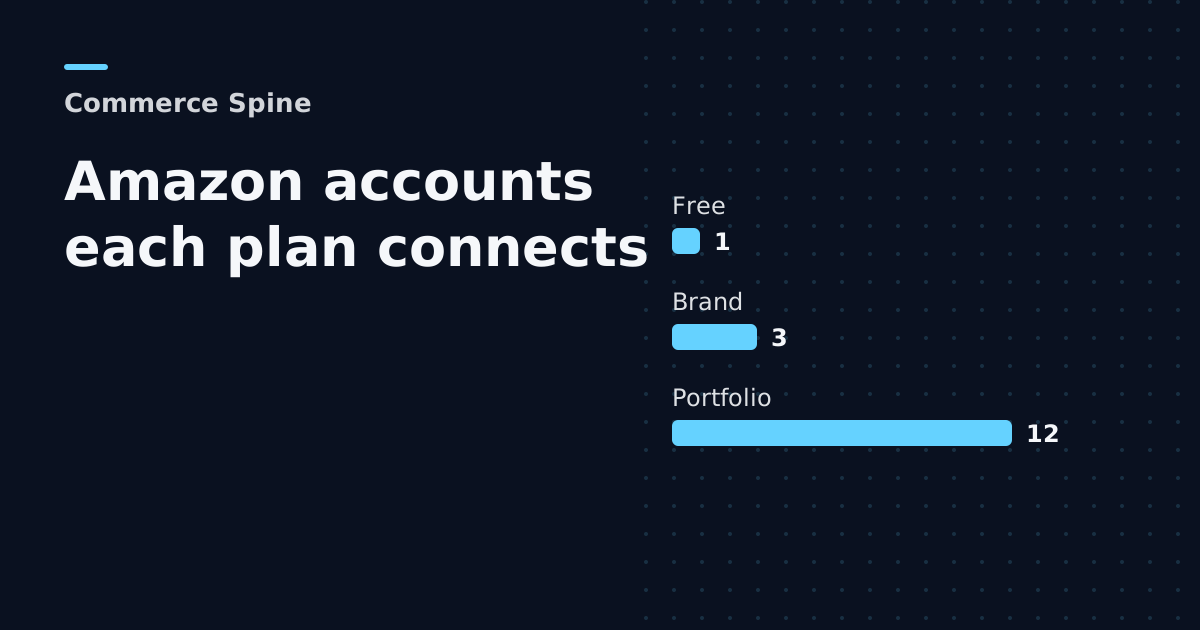
The free plan costs $0 and covers one connected account with 30 days of history. It allows 20 requests an hour, 40 a day, a 30-day window per query and 1.5 GB of data scanned per month. It is the full API on real data, with no credit card and no expiry. [cs-site]
Brand costs $49 for up to 3 connected accounts, with 1,000 requests a day, a 90-day query window and 150 GB scanned. Portfolio costs $149 for up to 12 accounts. Both paid plans include 5 hours with a senior AI developer. Price scales with connected accounts and never with the number of questions you ask. [cs-site]
When is a dashboard tool the better pick?
A dashboard tool fits better when nobody on your team runs an AI agent or writes scripts. Commerce Spine is thin on purpose: its console covers the data catalog, account connections, tokens, team access and skills, and it has no chat window of its own. [cs-site]
If you want ready-made screens, our overview of Amazon analytics tools compares 10 options, including Amazon Brand Analytics. If you already run Claude, Codex or Cursor, the data layer is the missing piece, and your agent can join it with any other API it reaches. [cs-site]
Frequently asked questions
Is Amazon Brand Analytics the same as seller analytics?
No. Brand Analytics is one Amazon source among several, with store analytics reports on performance and shopper behavior. Seller analytics also covers ads, orders, inventory and listings, which live in other systems. Commerce Spine joins Brand Analytics with the Ads API, Seller Central and three more sources in one warehouse.
How far back can I query my Amazon data?
Commerce Spine backfills 30 days at the first sync for every account and keeps everything from that day forward, so your history grows over time. A single query covers up to 90 days on a paid plan and 30 days on the free plan. Split longer periods into smaller windows.
Can Commerce Spine change my bids or listings?
No. Every token is read-only, so nothing Commerce Spine ships can touch your bids, listings, prices or inventory. Your agent reads the data and drafts reports or proposals, and you make the changes yourself. Access runs through Amazon's own authorization flow, where you can revoke it at any time.
Which AI tools can read the data?
Claude Desktop and Claude Code use the native Commerce Spine plugin. Codex, Cursor and any script or HTTP client call the read-only GraphQL API with a bearer token. Your prompts and results go to the model you chose under your own agreement, and Commerce Spine never proxies that AI traffic.
Sources
Want more of this in your Google results? Add Commerce Spine as a preferred source.
Published · Updated