What does an Amazon reporting tool do?
An Amazon reporting tool collects your store and advertising numbers and puts them in a form you can compare over time. There are three common routes: Amazon's own report files, a dashboard product with fixed screens, or a data layer your own software queries. Commerce Spine is the data layer. [cs]
That choice suits sellers, agencies and vendors who already run a coding agent such as Claude Code, Codex or Cursor. You describe the report in plain words. The agent reads the API, writes the job and shows you the result. Plain scripts can call the same API. [cs] [cs-site]
Which Amazon reports can you build?
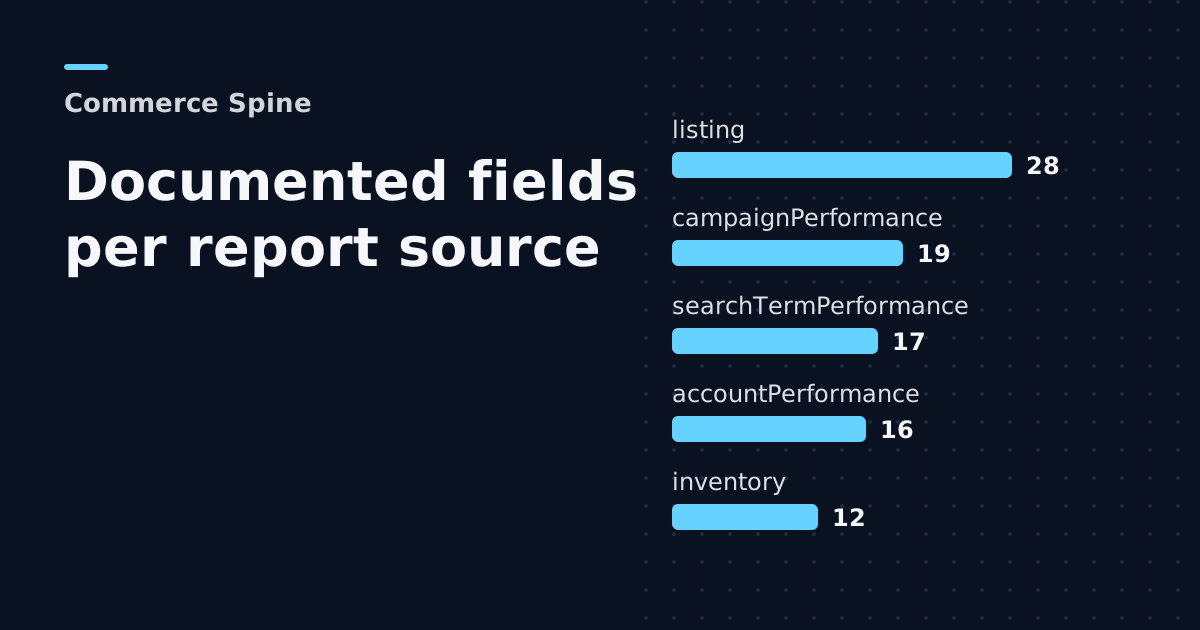
You can build any report that fits the 9 entities in the public API reference, from a daily account view down to single search terms. The table maps common reports to the entity and fields each one reads. The data coverage overview lists the full catalog. [cs] [cs-site]
Performance entities return rows, totals, a pageInfo cursor and queryInfo metadata, and the totals include derived ACOS and ROAS. Inventory and listing work differently. They take no date range and return the latest snapshot for each account. [cs]
| Report you want | Commerce Spine | Fields it reads |
|---|---|---|
| Weekly account summary | accountPerformance | orderedRevenue, totalProductSales, adSpend, adRevenue, derived ACOS and ROAS |
| Product sales and reviews | productPerformance | orderedRevenue, shippedUnits, averageRating, reviewCount per SKU |
| Campaign budget check | campaignPerformance | adSpend, adOrders, dailyBudget, ntbOrders |
| Search terms with spend and no orders | searchTermPerformance | searchTerm, adSpend, adOrders, isBrandTerm |
| Bids by keyword | keywordPerformance | keywordText, matchType, currentBid, adSpend |
| Days of stock left | inventory | daysOfSupply, unitsSoldLast30Days, recommendedReplenishmentQty |
| Listing status | listing | status, price, quantity, fulfillmentChannel |
What do Amazon's own reports leave to you?
Amazon's own reports leave you the storage, the joins and the upkeep. According to Amazon's Reports API documentation, you use that API to monitor inventory, track orders, get tax information and track returns. You request a report, verify that processing is complete and then retrieve it. [amazon]
The same page warns that Amazon periodically adds new fields and field values, so any parser you write has to handle those updates. That upkeep lasts as long as your homemade tool does. [amazon]
Access takes work too. Amazon's roles page says a call without the required role gets a 403 error. Its rate limit page says a request with no token left in the bucket is throttled and returns an error. Ad data is a separate door: the Amazon Ads API requires an application and approval before access is granted. [amz-roles] [amz-limits] [amz-ads]
Commerce Spine already carries the approved marketplace application. You authorize your accounts through Amazon's own flow, and you can revoke that access there at any time. SellerPlex, the agency behind Commerce Spine, runs its own departments on this same platform. [cs-site]
How does an AI agent build a weekly report?
An AI agent builds a weekly report by writing a short script against the API, which you then run on a schedule. Claude Desktop and Claude Code connect through the official plugin. Codex, Cursor and your own scripts send the same queries with a bearer token. The how it works section shows the setup. [cs] [cs-site]
A Monday account summary takes 3 requests. amazonAccounts returns the account IDs you may use. dataFreshness returns the latest report date, so the report can say how current it is. accountPerformance then takes a from and a to date and returns totals for adSpend, adRevenue and orderedRevenue, with ACOS and ROAS already derived. [cs]
A search term report follows the same pattern. The job reads searchTerm, adSpend and adOrders for the week, keeps the rows with spend and no orders, and ranks them by spend. isBrandTerm lets it set your branded searches apart. Pages hold up to 500 rows, and the job passes each endCursor back as after to get the next page. [cs] [cs-site]
A job that runs unattended should read the error code at errors[].extensions.code. DATE_RANGE_TOO_LARGE means the period needs splitting. FORBIDDEN_ACCOUNT_SCOPE means the account sits outside what the token may read, and UNAUTHENTICATED means the token is missing or invalid. [cs]
Can one report cover several accounts?
Yes, one report can cover every account your token may read. Leave out accountIds and the API uses the complete set of authorized accounts. A query that names an account outside that set returns FORBIDDEN_ACCOUNT_SCOPE, so one client's token cannot read another client's numbers by mistake. [cs]
Each accountPerformance row carries accountId, accountName, countryCode and currencyCode. That matters for an agency or a seller in several marketplaces, because totals across currencies mean little. Have the job group rows by currency first, then compare accounts within each group. amazonAccounts also returns the marketplace name and region for every account, so the report can label each line in plain words. [cs]
How much history can a report cover?
A report can cover whatever has built up since your first sync, which backfills 30 days on every plan. One query spans at most 30 days on the free plan and 90 days on a paid plan. Once your paid history reaches 180 days, a trend over that period takes 2 queries. [cs] [cs-site]
Stock and listing reports behave differently because they read the latest snapshot. To chart stock over time, your job has to save each run. Our guide to Amazon reporting data explains how the snapshots work, and the inventory alerts article covers the stock side. [cs]
How much does this Amazon reporting tool cost?
Commerce Spine costs $0 for one connected account, $49 for up to 3 and $149 for up to 12. Above 12 accounts, you talk to us about a price. Both paid plans include 5 hours with a senior AI developer. Your AI costs stay with your own model provider. [cs-site]
The limits apply per organization, so extra tokens do not buy extra quota. At 500 rows a page, 40 requests allow at most 20,000 rows a day on the free plan. That leaves room for the 3-request Monday summary on a real account, as long as the scan limit holds. [cs-site]
| Limit | Commerce Spine |
|---|---|
| Requests per hour | Free 20, paid 3,600 |
| Requests per day | Free 40, paid 1,000 |
| Days per query | Free 30, paid 90 |
| GB scanned per month | Free 1.5, paid 150 |
| Rows per page | 500 on every plan |
When is a dashboard the better pick?
A dashboard is the better pick when nobody on your team runs an AI agent or writes scripts. Commerce Spine has no chat window of its own and depends on the agent you bring. Our overview of Amazon analytics tools compares 10 options, including finished dashboards such as Nova Analytics and Sellerboard. [cs-site]
The read-only design sets another limit. Reports can flag a bid or a budget, but nothing Commerce Spine ships can change one. You act on the finding in your own tools, and you can read that code before it runs. [cs] [cs-site]
Frequently asked questions
Is Commerce Spine a dashboard?
No. Commerce Spine is a managed Amazon data warehouse with a read-only API, and your own agent or script builds the report on top of it. If you want a report on a web page, your agent can write one that reads the API. You then keep the code and control what it shows.
Can a reporting tool change my Amazon bids or listings?
Commerce Spine cannot. Every token is read-only, so nothing it ships can touch your bids, listings, prices or inventory. A report can draft a proposal, such as keywords above your target ACOS, and you decide what to change. Access runs through Amazon's own authorization flow, and you can revoke it there.
Which AI tools can build these reports?
Claude Desktop and Claude Code use the official Commerce Spine plugin. Codex, Cursor, custom agents and plain scripts call the same read-only API with a scoped bearer token. Anything that can make an HTTPS request can run a report. Your prompts and results go to the model you chose, under your own agreement.
How do I know how current a report is?
Ask dataFreshness. That query returns the latest available date for each asset, or for one asset you name, so a report can print the date behind its numbers. Inventory freshness is the latest successful run across its three Seller Central reports. Listing freshness comes from the All Listings Report only.
Sources
Want more of this in your Google results? Add Commerce Spine as a preferred source.
Published · Updated